Game On: Unlocking the Power of Editable Text Effects
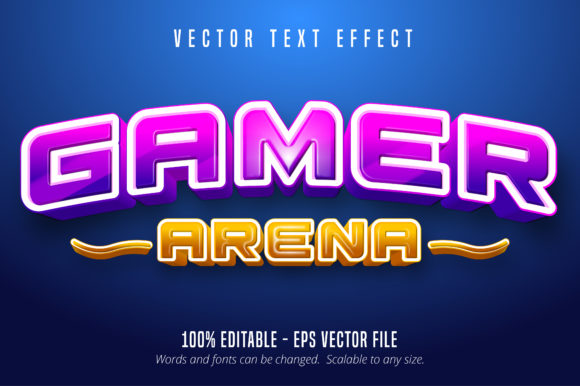
Every designer knows the struggle of finding a typeface that doesn't just sit on the page but actually jumps out and grabs the viewer by the collar. When you are working on a project that demands high energy—whether it’s an esports tournament flyer, a Twitch overlay, or a merchandise line for a gaming brand—standard corporate fonts often fall flat. You need something that screams "action" without sacrificing the ability to tweak and customize the final look. This is exactly where specialized design assets come into play, specifically those that bridge the gap between static typography and dynamic graphic art. The Gamer Style Full Editable Text Effect offers a unique solution for creatives who want that gritty, competitive aesthetic but still need full control over their workflow in Adobe Illustrator.
Beyond Static Typography
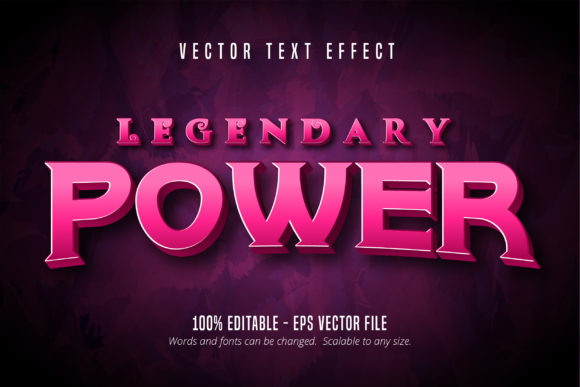
It is important to clarify right away that this isn't a traditional font file that you simply install into your operating system. Instead, think of it as a powerful design asset. The "Gamer Arena" aesthetic is built directly into the effect, utilizing vector paths and appearance attributes to simulate depth, texture, and lighting that would usually take hours to build from scratch. Because it is packaged as an EPS CS6+ file, it integrates seamlessly into professional vector workflows.
The real value here lies in the "editable" aspect. We have all been there: you download a cool graphic element, only to realize it’s a flattened JPG or a locked PDF where you can't change the letters. That roadblock stops creative flow dead. With this text effect, you are not locked into a specific phrase. If you need to change "Player One" to "Boss Level," or switch a brand name to a specific slogan, you simply use the text tool in Illustrator to swap the letters. The heavy lifting—the 3D extrusions, the metallic textures, and the sharp edges—is already applied and updates instantly as you type.
Practical Applications for Modern Brands
While the name suggests a focus on gaming, the application of a high-impact display effect extends far beyond just video game fan art. In the current market, visual communication needs to be immediate. Attention spans are short, and your graphics need to communicate the vibe of the brand in a split second.
Consider the following scenarios where this style of typography shines:
- Logo Design and Brand Identity: For brands targeting a younger demographic or those in the tech/entertainment sector, a stylized wordmark can set the tone instantly. It suggests innovation and energy.
- Social Media Graphics: Platforms like Instagram and TikTok are crowded. A post featuring bold, textured typography stops the scroll. It works exceptionally well for announcing sales, new product drops, or live stream schedules.
- Packaging Design: If you are designing packaging for energy drinks, tech accessories, or even spicy snacks, this typeface effect provides the shelf appeal needed to compete with established giants.
- Merchandise and Apparel: T-shirt designs and hoodies often rely on text-based art. A full editable text effect allows you to mock up designs for print-on-demand services quickly, ensuring the text looks crisp on fabric.
- Event Invitations and Posters: Hosting a LAN party, a charity stream, or a launch party? The "arena" vibe creates an immediate sense of excitement and occasion that standard serif or sans serif fonts cannot match.
Streamlining the Design Workflow
One of the most significant hurdles in design is time management. Customizing text effects manually in Illustrator involves complex steps: offsetting paths, applying gradients, adding multiple stroke layers, and creating custom shadows. For a busy entrepreneur or a freelance designer juggling multiple clients, spending four hours on a single headline is rarely viable.
By using a pre-made but fully editable effect, you essentially bypass the technical labor and jump straight to the creative application. The file is scalable to any size, meaning the same asset works for a massive billboard or a small favicon without losing quality. This scalability is crucial for maintaining visual consistency across different platforms. Your logo on a business card will have the exact same sharp details as your banner on a website.
Furthermore, the ability to edit the text allows for rapid prototyping. If a client wants to see three different taglines rendered in that specific "gamer" style, you can generate those mockups in minutes rather than hours. This efficiency translates directly to better client relations and higher profit margins for designers.
Tips for Pairing and Readability
When working with a high-impact display font effect like the Gamer Style, context is everything. Because this style is inherently bold, textured, and visually "loud," it should rarely be used for body copy. Trying to read a paragraph of this textured, aggressive typography will cause eye strain and defeat the purpose of the design.
Instead, treat this as a headline or accent font. The contrast is what creates visual interest. Here is how to approach it:
- Pair with a Clean Sans Serif: The grit of the gamer text effect pairs beautifully with a clean, geometric sans serif font. Use the gamer style for the main headline to grab attention, then use a font like Montserrat, Roboto, or Helvetica for the supporting information. This ensures your message is readable while maintaining the edgy vibe.
- Watch Your Color Contrast: Text effects often have shadows and bevels that can reduce contrast against certain backgrounds. Avoid placing this text over busy photographs unless you add a solid color block or a subtle overlay behind the text to help it pop.
- Spacing Matters: Highly stylized letters can sometimes look cramped. Don't be afraid to adjust the tracking (letter spacing) in Illustrator. Giving the letters a little breathing room can actually make the effect look more premium and easier to digest.
Commercial Use and Final Considerations
Before incorporating any design asset into a commercial project, it is vital to understand the licensing. A professional-grade asset like this usually comes with a license that covers both personal and commercial use, allowing you to use the final designs on products you sell or for clients. However, you generally cannot redistribute the raw file itself.
When you are ready to dive in, ensure your version of Adobe Illustrator is compatible with CS6 or later to guarantee the layers and effects render correctly. Take some time to explore the layers panel; often, these files include separate elements for the background or additional graphic accents like sparks or scratches that you can toggle on or off to customize the intensity of the look.
Ultimately, the goal of any design asset is to solve a visual problem. If your problem is a lack of energy, a lack of time, or a need for a modern, aggressive aesthetic, leveraging a high-quality, editable text effect is a smart, professional move. It gives you the freedom to change your message on the fly while keeping the visual standard consistently high. Whether you are building a brand from the ground up or refreshing an existing social media campaign, having this tool in your library ensures you are always ready for game time.